
You service your car because you depend on it. You check the tyres, change the oil, and pay attention when a warning light appears. Those small acts of care help keep the car reliable—and can sometimes prevent a much bigger repair bill.
Your iPhone and MacBook deserve attention, too. You depend on them for work, navigation, payments, photographs, and conversations with the people you care about. Yet it is easy to overlook the heat they deal with until something goes wrong.
What happens when a car runs too hot?
A car engine is designed to operate at high temperatures, and its cooling system helps keep that heat under control. Routine servicing gives a mechanic a chance to spot issues such as coolant leaks or a failing cooling component before they leave you stranded.
If an engine overheats severely and the car keeps running, the consequences can reach beyond the cooling system. Excess heat can distort the cylinder head or damage the head gasket, leading to a more involved repair. In serious cases, the engine itself can suffer damage. Haynes explains how overheating can affect the head gasket and cylinder head.
The bill is only part of the problem. There may also be towing, missed appointments, time at a garage, and the uncertainty of wondering whether the car will make the next trip.
A temperature gauge does not repair the engine. But it gives you a reason to stop, investigate, and avoid making a bad situation worse.
What happens when an iPhone or MacBook gets too hot?
An iPhone is not a car engine, and warmth alone does not mean something is broken. Your iPhone can feel warm during a software update, a video call, gaming, charging, or a long camera session. Apple says these situations can be normal and that the device should cool down when the activity ends.
But heat can still affect reliability. When an iPhone or iPad gets too warm, it may slow or pause charging, dim its display, reduce performance, or temporarily limit camera features. In more extreme conditions, it may show a temperature warning and become temporarily unavailable. These are protective responses, but they can arrive at an inconvenient moment—when you need directions, a charged iPhone, or a camera that is ready to use. Apple Support: If your iPhone or iPad gets too hot or too cold
There is a longer-term cost to consider too. Apple says exposure to high ambient temperatures can permanently reduce battery capacity. A battery that holds less charge may mean more time near a charger, an eventual battery replacement, or a lower exchange offer. Apple: Maximizing Battery Life and Lifespan
The repair bill may involve more than the battery
The battery is only one part of an expensive device. A MacBook also depends on its logic board, display, storage, and other components. Hardware can fail for many reasons, and a warm MacBook does not tell you which part, if any, is damaged. But a failure outside the battery can bring a much larger repair decision.
I learned that with my 2017 MacBook Air. I bought it for ₹49,990 and used it for long workdays with many apps open. It often ran hot, and the fan stayed loud. I got used to it and kept working. Then one morning, it did not turn on.

The service center quoted ₹32,000 for a logic board and ₹2,500 for service: ₹34,500 in total, or roughly 69% of the laptop’s original purchase price.

I cannot say heat alone caused the failure. Logic boards can fail for different reasons, and the quote does not establish the cause. What I do know is that I ignored a pattern for months, then faced an expensive repair and a machine I could no longer rely on.
A swollen battery is another reason to take a device’s condition seriously. Swelling can push a display, button, or trackpad out of alignment. It has several possible causes, so swelling should not automatically be blamed on heat. If you suspect a battery is swollen, stop using and charging the device and seek professional service; do not press on or puncture it. iFixit: What to do with a swollen battery
A smaller battery-health number can still cost real money
My iPhone 12 mini gave me a different lesson. When I went to exchange it, its initial value was ₹24,600. Its Battery Maximum Capacity had fallen below 85%, and the offer was reduced by ₹7,400, to ₹17,200.

That was one exchange offer, not a universal rule. Buyers use different criteria, and batteries age for several reasons, including time, charging patterns, and temperature history. I cannot say heat caused that particular reduction in battery health. Still, seeing the difference in rupees made the value of everyday care feel very real.
Why a fanless MacBook Air needs a different kind of warning
My older MacBook Air had a fan I could hear. MacBook Air models with Apple silicon use a fanless design, so there is no fan noise to draw your attention during demanding work. Apple designed them that way, and silent operation is normal. Apple: MacBook Air
That makes a visible signal especially useful when you are running a long export, building an app, using AI tools, or working in a warm room. You may be focused on the task and not notice that the Mac is under sustained thermal pressure.
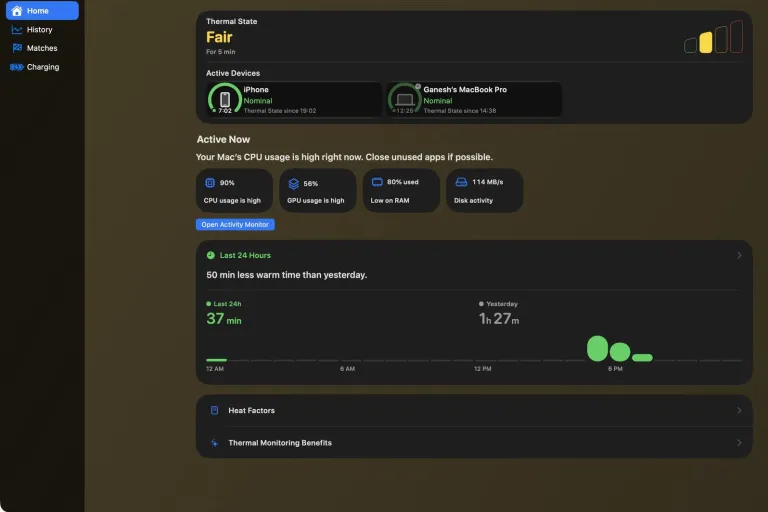
Sabja gives you a way to check that pressure at a glance. With Sabja Pro alerts, you can also receive a notification when Thermal State rises, even while you are working in another app. It is a useful companion for a quiet MacBook Air: the silence can continue, while you get a clearer signal about when to ease the workload.

Think of Sabja as a dashboard for your Apple devices
A car’s dashboard helps you notice a change before deciding what to do. That is the role I wanted Sabja to play for iPhone, iPad, Mac, and Apple Watch.
Sabja shows the Thermal State reported by the operating system: Nominal, Fair, Serious, or Critical. It is a signal of thermal pressure, not a temperature measurement in degrees and not a diagnosis of damaged hardware.
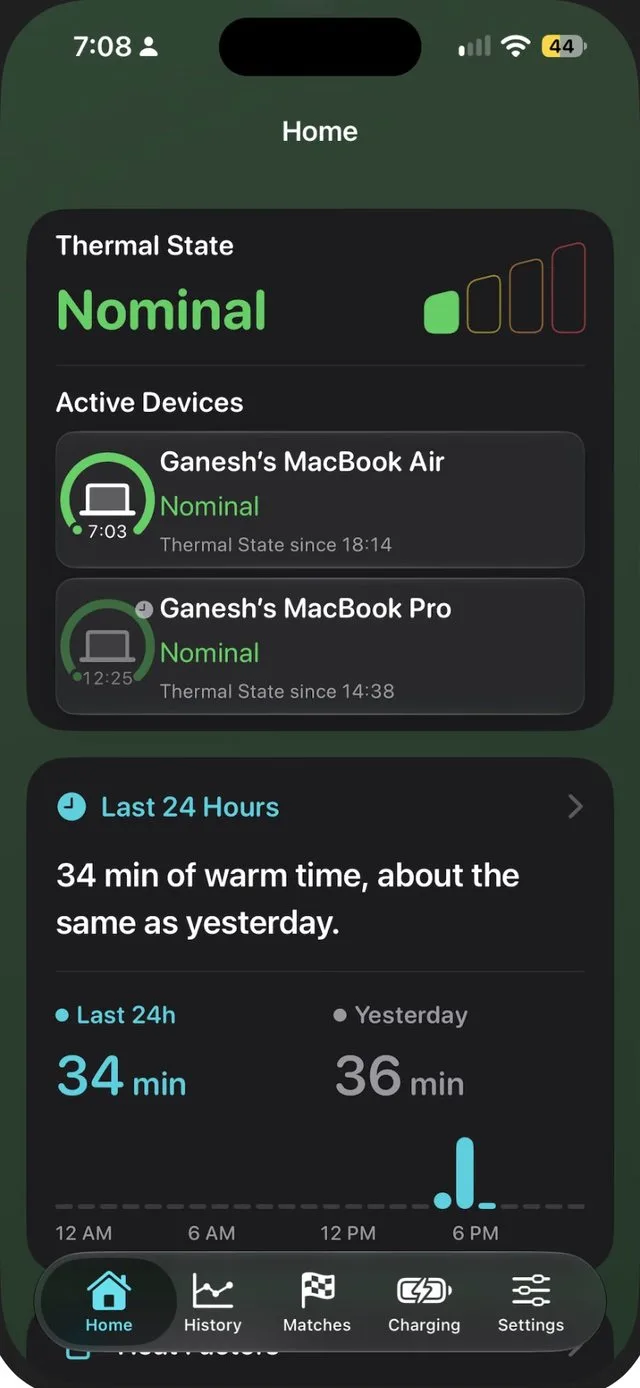
A glance can help you connect the state with what you are doing. Perhaps your iPhone is charging in direct sunlight while running navigation. Perhaps your MacBook is exporting video while several demanding apps are open. If the state remains elevated, you can make a small change and see whether things settle.
Sabja Pro also offers history, helping you notice recurring warm periods rather than relying on memory. On Mac, Sabja can show current activity and help you open Activity Monitor to investigate what is keeping the machine busy.
Sabja cannot cool an iPhone or MacBook, repair a component, prove what caused a failure, or guarantee that a device will last longer. Its value is awareness: it helps you notice a pattern while you still have a choice about what to do next.
How to reduce heat on your iPhone and MacBook
You do not need to watch your devices all day. A few habits are enough to make heat awareness part of your routine:
- Keep your iPhone and MacBook out of hot cars and direct sun. Apple recommends using iPhone and iPad in ambient temperatures between 0°C and 35°C, and Mac laptops between 10°C and 35°C. Those are surrounding-air temperatures, not Sabja readings. Apple’s iPhone guidance · Apple’s Mac guidance
- Give your MacBook room to breathe. Use it on a stable surface with good ventilation and keep any vents clear. A bed or blanket can interfere with heat dissipation.
- Pay attention during demanding work. Gaming, navigation, video calls, exports, and charging can all make a device warmer. If thermal pressure stays high, reduce the workload or take a break and let it cool.
- Respond to the device’s own warnings. If an iPhone displays a temperature warning, Apple advises turning it off, moving it somewhere cooler, and allowing it to cool.
- Investigate persistent problems. If a MacBook remains unusually hot during light work despite good ventilation, or its fan runs hard on a model that has one, follow Apple’s support guidance or contact a service professional.
A well-maintained car can still break down. A carefully used iPhone or MacBook can still need a repair. Care is not a guarantee; it is a way to notice problems sooner and give the devices you depend on a better chance to serve you reliably.
You already know why a car needs a dashboard. Your Apple devices deserve a little attention, too.
See your Apple devices in a new light
Check Thermal State with Sabja and discover the habits that help your devices stay comfortable.
Get Sabja on the App Store